QNAP QVR Pro license price, the QVR Pro Gold license and the QNAP Surveillance Station license
- Prices from the QNAP Software Store
- Written by a detection product that works beside QVR
Interior, after hours
Fixed camera, low light, two subjects
Analysing the clip
Clip
Decoded in your browser. Your video is never uploaded.
Sets the luma delta threshold and the smallest region that counts.
Kills the one frame flicker that no operator wants paged about.
Exclude zone
Put it over the road, the tree, the neighbour's window. Events inside it stop alerting.
The frame an event was found on shows up here.
Nothing selected yet
Hover a row in the event table to preview its frame, click it to hold the frame and jump the clip there.
- Length
- 0.0s
- Confidence
- 0%
- Area
- 0.0%
0
Motion events found
0
Dropped by zone
0
Dropped, too short
0
Alerts you would get
| # | Start | Length | Class | Conf. | Area |
|---|
Reading the clip. Events appear here as they are found.
Get these alerts from your own cameras.
Three QNAP recording apps, and only one of them is still the one to buy.
Prices are read from the QNAP Software Store in US dollars. License rules are from QNAP's own FAQ pages and its November 2025 launch notice.
QVR Surveillance
Current, since November 2025
The app QNAP sells today. Eight channels are free (two built in, six more once you register the app with a QNAP ID), extra channels are $69 each perpetual or $19.99 a year, and AI search, the QVR Center management tool and myQNAPcloud Surveillance backup are part of it.
QVR Pro and QVR Elite
Still licensed, being folded in
QVR Pro (perpetual, 8 free channels, up to 128) and QVR Elite (subscription, 2 free, up to 192) still take licenses. QNAP says Elite licenses carry straight into QVR Surveillance, and QVR Pro 2.8 in 2026 brings a migration tool, with about three more years of security updates.
Surveillance Station
Licenses not sold since August 2021
QNAP stopped selling Surveillance Station licenses on August 1, 2021. Existing keys keep working on the NAS they were activated on, since they are not transferable, and the only new keys are old stock at third party resellers, which QNAP does not vouch for.
What every QNAP camera license costs, by product.
List prices on software.qnap.com. Perpetual channel licenses are the same price for QVR Pro and QVR Surveillance.
QVR Surveillance or QVR Pro, 1 channel
- What you get
- One extra camera channel
- US price
- $69
- Billing
- Once, perpetual
QVR Surveillance or QVR Pro, 4 channels
- What you get
- Four extra channels, $64.75 each
- US price
- $259
- Billing
- Once, perpetual
QVR Surveillance or QVR Pro, 8 channels
- What you get
- Eight extra channels, $59.88 each
- US price
- $479
- Billing
- Once, perpetual
QVR Pro Gold
- What you get
- Eight extra channels, unlimited playback, central management in QVR Center
- US price
- $499
- Billing
- Once, one per NAS
QVR Pro Unlimited Playback
- What you get
- Lifts the 14 day playback limit of the free tier
- US price
- $99
- Billing
- Once
QVR Surveillance or QVR Elite, 1 channel
- What you get
- One extra channel by subscription
- US price
- $1.99 a month, $19.99 a year, $49.99 for 3 years
- Billing
- Recurring
QVR Center (for QVR Pro or Elite)
- What you get
- Central management of several QVR servers
- US price
- $9.99 a month, $99.99 a year, $269.99 for 3 years
- Billing
- Recurring, included in QVR Surveillance
QVR Human
- What you get
- People counting on the NAS
- US price
- $4.99 a month, $49 a year, $129 for 3 years
- Billing
- Recurring
| License | What you get | US price | Billing |
|---|---|---|---|
| QVR Surveillance or QVR Pro, 1 channel | One extra camera channel | $69 | Once, perpetual |
| QVR Surveillance or QVR Pro, 4 channels | Four extra channels, $64.75 each | $259 | Once, perpetual |
| QVR Surveillance or QVR Pro, 8 channels | Eight extra channels, $59.88 each | $479 | Once, perpetual |
| QVR Pro Gold | Eight extra channels, unlimited playback, central management in QVR Center | $499 | Once, one per NAS |
| QVR Pro Unlimited Playback | Lifts the 14 day playback limit of the free tier | $99 | Once |
| QVR Surveillance or QVR Elite, 1 channel | One extra channel by subscription | $1.99 a month, $19.99 a year, $49.99 for 3 years | Recurring |
| QVR Center (for QVR Pro or Elite) | Central management of several QVR servers | $9.99 a month, $99.99 a year, $269.99 for 3 years | Recurring, included in QVR Surveillance |
| QVR Human | People counting on the NAS | $4.99 a month, $49 a year, $129 for 3 years | Recurring |
The detail that decides a QVR Pro order is Gold. It costs $20 more than the eight channel pack and adds unlimited playback, which on its own is $99. Without it, the free QVR Pro tier only lets QVR Pro Client play back the last 14 days, so a site that keeps 30 days of video and runs QVR Pro should buy Gold first and single channels after. You can only activate one Gold license per NAS.
The subscription route is cheaper up front and dearer over time. At $19.99 a channel a year, a subscription channel passes the $69 perpetual price in the fourth year, so the monthly and yearly plans suit a site that is testing cameras or expects to move off QNAP, and perpetual suits everyone else.
License cost by camera count, QVR Surveillance
8
- Perpetual, once
- $0
- Or per year
- $0
12
- Perpetual, once
- $259
- Or per year
- $79.96
16
- Perpetual, once
- $479
- Or per year
- $159.92
32
- Perpetual, once
- $1,437
- Or per year
- $479.76
| Cameras | Perpetual, once | Or per year |
|---|---|---|
| 8 | $0 | $0 |
| 12 | $259 | $79.96 |
| 16 | $479 | $159.92 |
| 32 | $1,437 | $479.76 |
After the eight free channels. Perpetual uses the cheapest mix of 8, 4 and 1 channel packs.
Pick the license by the app your NAS already runs.
QNAP licenses are tied to the app and activated on the NAS through License Center, so a QVR Pro key does nothing for Surveillance Station and the other way round.
New install, any QNAP NAS
Install QVR Surveillance from App Center, register it for the eight free channels, and buy channel licenses only past eight cameras. Choose perpetual unless you plan to leave QNAP within three years.
Up to eight cameras cost nothing.
Running QVR Pro today
Channels and Gold still sell and keep working. If you keep more than 14 days of video, Gold at $499 is the first purchase. QNAP says QVR Pro licenses transfer to QVR Surveillance, with camera settings to redo, and a migration tool ships in QVR Pro 2.8.
Plan the move within three years.
Running QVR Elite today
Update to QVR Surveillance. QNAP states the Elite subscriptions and channels carry over with no data migration, and registration adds the six bonus channels on top.
Often the cheapest fix of all.
Still on Surveillance Station
You cannot buy more channels from QNAP. Rather than chase old keys, move the cameras to QVR Surveillance, where eight channels cost nothing and the rest are $69 each.
Old keys cannot follow you.
What a QVR license does not buy, and why the NAS processor matters.
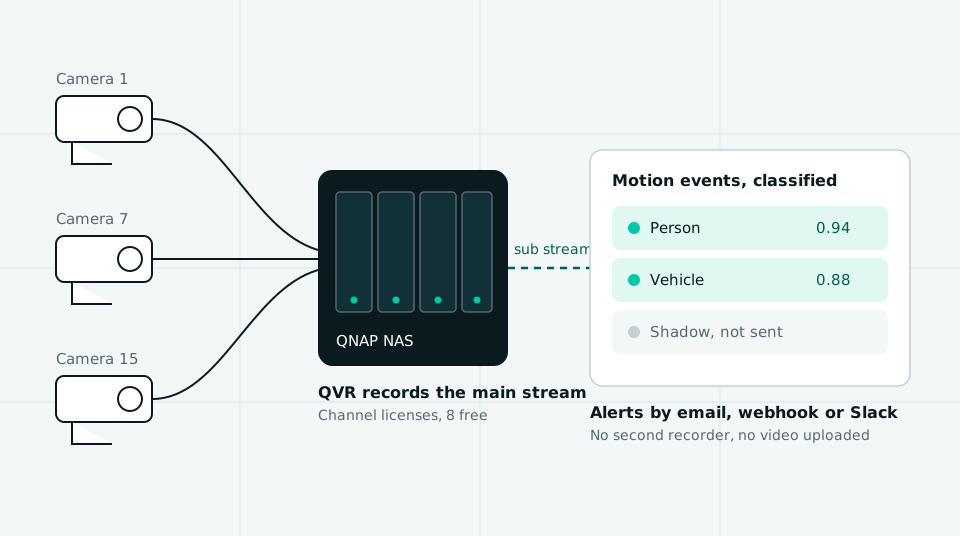
A channel license lets the NAS record one more camera. It does not change what counts as an event. QVR takes motion events from the camera's own firmware or from its own motion detection, and on most cameras more than a few years old that is pixel change, which fires on headlights, rain, shadows and insects near the lens.
QNAP does run analytics on the NAS itself, and its FAQ is plain about the hardware: face detection needs a Celeron class processor or better, and human detection needs an Intel Core i series processor or better. The ARM and Celeron units at the lower end of QNAP's range cannot run human detection, whatever license you add.
That leaves two routes to person alerts: replace the NAS with a Core i model, or leave the NAS as the recorder and classify events somewhere else. The second is what we sell. Our person detection camera software reads the same RTSP stream QVR records and labels each motion event before it alerts.
What fifteen cameras cost on a QNAP, and where a detection layer fits.
License cost only. The NAS, disks, cameras and installation are the same whichever row you pick.
QVR Surveillance, perpetual
- Up front
- $466
- Per year after
- $0
- Five years
- $466
- What it includes
- Eight free channels, one 4 channel pack and three single channels. Recording, live view, playback, AI search.
QVR Surveillance, yearly subscription
- Up front
- $139.93
- Per year after
- $139.93
- Five years
- $699.65
- What it includes
- Seven subscription channels at $19.99 on top of the free eight.
QVR Pro with Gold
- Up front
- $499
- Per year after
- $0
- Five years
- $499
- What it includes
- Sixteen channels and unlimited playback. The cheapest QVR Pro route for 15 cameras.
QVR Pro without Gold
- Up front
- $565
- Per year after
- $0
- Five years
- $565
- What it includes
- Seven channels at $466 plus Unlimited Playback at $99.
MotionDetection, Operate tier
- Up front
- $888
- Per year after
- $888
- Five years
- $4,440
- What it includes
- Person, vehicle, animal and package classification on 15 cameras, 30 day event history, 5 users, webhook and Slack. No recording.
| Option | Up front | Per year after | Five years | What it includes |
|---|---|---|---|---|
| QVR Surveillance, perpetual | $466 | $0 | $466 | Eight free channels, one 4 channel pack and three single channels. Recording, live view, playback, AI search. |
| QVR Surveillance, yearly subscription | $139.93 | $139.93 | $699.65 | Seven subscription channels at $19.99 on top of the free eight. |
| QVR Pro with Gold | $499 | $0 | $499 | Sixteen channels and unlimited playback. The cheapest QVR Pro route for 15 cameras. |
| QVR Pro without Gold | $565 | $0 | $565 | Seven channels at $466 plus Unlimited Playback at $99. |
| MotionDetection, Operate tier | $888 | $888 | $4,440 | Person, vehicle, animal and package classification on 15 cameras, 30 day event history, 5 users, webhook and Slack. No recording. |
Buy the QNAP license if
you need more cameras recorded, or your NAS has a Core i processor and QVR's own human detection is good enough. A perpetual QNAP channel is cheap next to any subscription, and nothing we sell records video. Buy the channels and stop reading.
Add a detection layer if
the recording is fine and the alerts are the problem: a Celeron or ARM NAS that cannot run human detection, cameras whose own motion events are noise, or a team that wants events in Slack, a webhook or a shared inbox instead of the QVR Pro Client. That is $49 a month for four cameras or $888 a year for fifteen, next to the NAS you keep.
Classification on the stream your NAS already records, with no second recorder.
Connect
Give it the RTSP URL of each camera, or let it find them over ONVIF. It reads the low resolution sub stream, so QVR keeps the main stream and the NAS load does not change.
Detect
Our own background model finds regions that really moved and joins them into events. Sensor noise, compression shimmer and single frame flicker are dropped before anything is classified.
Classify
Crops from each event are labeled person, vehicle, animal, package or other motion, with a confidence value. Continuous video never leaves your network.
Alert
Only events outside your exclude zones, longer than your minimum duration and in a class you picked reach you, by email, webhook or Slack.
On the other NAS brand, the Synology Surveillance Station license page totals the per camera cost the same way this one does, and the video management software guide compares license models across VMS vendors. If you are moving off the NAS to a Windows recorder, the Blue Iris license cost post covers the commercial use plan a business needs. For stream URLs and sub streams, see RTSP camera software.
Four things QVR does that this product does not.
-
Recording
QVR records every camera to the NAS disks and can back footage up to myQNAPcloud Surveillance. We keep events and their crops, not video, so a site with no recorder needs QVR or something like it first.
-
Live view and playback
QVR Pro Client runs live grids, synchronized playback and HDMI output from the NAS. Here you get an event list with crops, and you open footage in QVR.
-
Face recognition and people counting
QVR Face and QVR Human add face matching, door access and footfall counts on the NAS. We classify motion for alerts and do none of that.
-
Price for recording alone
Fifteen cameras on QVR Surveillance cost $466 once. Our Operate tier is $888 a year and records nothing.
QNAP QVR Pro license questions that come up before the order.
01
How much is a QVR Pro license?
A QVR Pro camera channel license costs $69 for one channel, $259 for four or $479 for eight on the QNAP Software Store, paid once. QVR Pro Gold is $499 and adds eight channels, unlimited playback and central management, and Unlimited Playback alone is $99. The first eight channels are free.
02
Is QVR Pro free?
Partly. QVR Pro includes eight camera channels at no cost, and supports up to 128 with paid licenses. The free tier limits playback in QVR Pro Client to the last 14 days, which the $99 Unlimited Playback license or the $499 Gold license removes.
03
What is QVR Pro Gold?
QVR Pro Gold is a $499 license that combines unlimited playback, eight extra camera channels and the right to be managed by QVR Center without using a QVR Center license. QNAP allows one Gold license per NAS, and it costs $20 more than the eight channel pack on its own.
04
What is the difference between QVR Pro and QVR Surveillance?
QVR Surveillance is the platform QNAP launched in November 2025 to replace QVR Pro and QVR Elite. It includes eight free channels after registration, sells channels both perpetual and by subscription, includes AI search and QVR Center, and scales to 1,024 channels per NAS. QVR Pro stops at 128 channels.
05
Can I still buy a QNAP Surveillance Station license?
Not from QNAP. The QNAP Software Store stopped selling Surveillance Station licenses on August 1, 2021, and existing licenses cannot be transferred to another NAS. Some third party resellers still list old keys, but QNAP does not guarantee them. QVR Surveillance is the supported replacement.
06
Can I transfer a QVR Pro license to another NAS?
Yes. Since November 21, 2022, QNAP has allowed QVR Pro licenses to be migrated to another QNAP NAS or a QVP recorder through License Center. QNAP also says QVR Pro licenses can move to QVR Surveillance, with camera settings reconfigured by hand.
07
Does QNAP have person detection?
Yes, on the right hardware. QVR Surveillance runs human detection on the NAS, but QNAP lists an Intel Core i series processor or better as the requirement, so ARM and Celeron models cannot run it. On those, alerts come from camera motion events unless you add a separate detection layer.
08
Can I get person alerts on a QNAP without replacing the NAS?
Yes. A detection layer can read the RTSP sub stream of each camera the NAS records and label every motion event as a person, vehicle, animal or package before alerting. MotionDetection does this from $49 a month for four cameras, or $888 a year for fifteen, beside the NAS you keep.
Related pages
Synology Surveillance Station license pack
Per camera keys for the other NAS based recorder.
Blue Iris license cost for business use
The $99.95 license, maintenance, and the commercial plan.
Dahua DSS Pro license price
A perpetual per channel VMS license with a 16 channel base.
DW Spectrum license pricing
Another perpetual per channel license, priced by pack.
Video management software for IP cameras
VMS platforms compared on license model and published price.
Video analytics software price
Four tiers, the per camera arithmetic, and no sales call attached.
Person detection camera software
Person alerts on the cameras you already own.
Keep the QNAP. Fix the alerts.
One field, one 6 digit code, and your console opens on that address. Pick the tier by camera count and pay by card, with no quote to wait for.